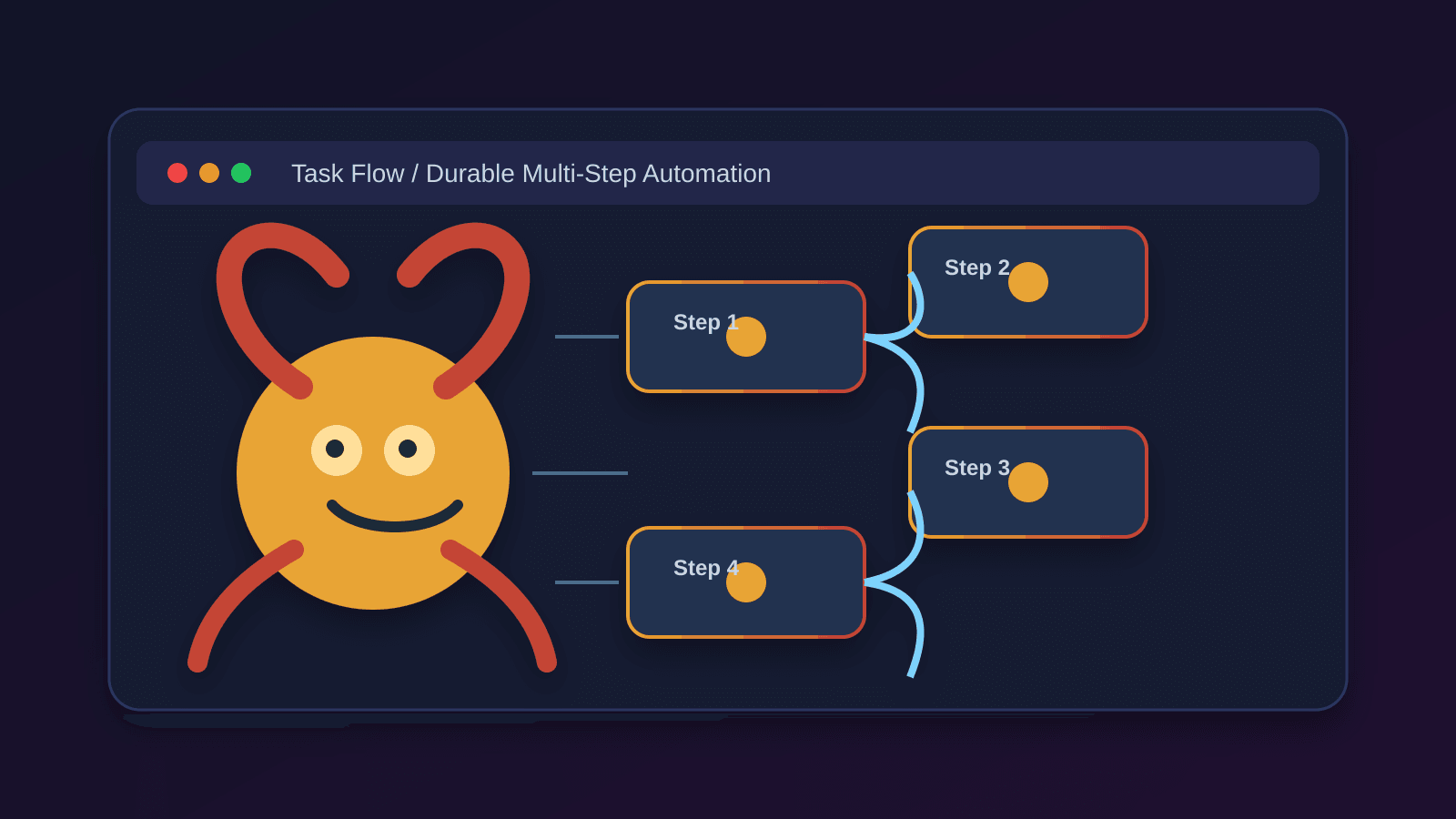
OpenClaw Task Flow: Durable Multi-Step Automations Without Losing State
Meta Description: Learn how OpenClaw Task Flow works, when to use it, and how to build durable multi-step automations that survive restarts and keep state in sync.
Primary Keyword: openclaw task flow Secondary Keywords: openclaw automation, openclaw tasks, durable workflows, multi-step automation, task orchestration Target Word Count: 1,900 words Target Audience: OpenClaw users who want to chain work across multiple steps Search Intent: Informational Tone: Technical but accessible CTA Goal: Get readers to use Task Flow for multi-step automations instead of forcing everything into one task
Introduction
OpenClaw gives you several ways to automate work, but they are not interchangeable. If you need to run one detached action, a plain task is enough. If you need something at a specific time, cron is the better fit. If you want the agent to react to events, hooks can do that. But if your work spans multiple steps and needs to survive restarts, OpenClaw Task Flow is the right tool.
This article is for OpenClaw users who want a clean mental model for durable automation. You will learn what Task Flow does, when to use it, how managed and mirrored modes differ, and how to avoid the most common mistakes.
In short: Task Flow coordinates a sequence of tasks and keeps progress durable.
Quick Takeaways
- Use plain tasks for single detached jobs.
- Use cron for work that must start at a specific time.
- Use hooks for event-driven reactions.
- Use Task Flow when one job depends on another and you need durable progress tracking.
- Managed mode lets Task Flow own the sequence end-to-end.
- Mirrored mode lets Task Flow observe external work and keep state synced.
What Is OpenClaw Task Flow?
Task Flow is OpenClaw's orchestration layer for durable multi-step work. It sits above individual background tasks and tracks the state of an entire flow instead of just one detached action.
That matters when your automation is not a one-off command. Some workflows are naturally sequential:
- gather data
- transform it
- write a report
- deliver the result
If each step depends on the previous step, and you want the whole process to survive interruptions, Task Flow gives you a better abstraction than a single task.
The core idea
A task is the unit of detached work. A flow is the unit of durable orchestration.
That distinction saves you from building fragile scripts that lose context halfway through.
Task Flow vs Tasks vs Cron vs Hooks
If you're deciding what to use, start here.
Plain task
Use a plain task when the job is simple and self-contained.
Examples:
- summarize a file
- transcribe audio
- fetch one API response
- send one notification
Cron
Use cron when the timing matters.
Examples:
- run at 6:00 AM every day
- remind me in 20 minutes
- kick off a weekly report every Monday
Hooks
Use hooks when you want OpenClaw to react to an event.
Examples:
- run when the gateway starts
- run when a session resets
- run when a tool is called
Task Flow
Use Task Flow when the work is multi-step, stateful, and durable.
Examples:
- collect data, then clean it, then publish it
- watch multiple tasks and move through phases
- orchestrate a workflow that must resume after a restart
Simple rule of thumb
If the work can be described as A then B then C, Task Flow is usually the right shape.
How Managed Mode Works
Managed mode is the easiest way to think about Task Flow.
In managed mode, Task Flow owns the lifecycle of the work. It creates the tasks for each step, waits for them to complete, and advances the flow automatically.
Imagine a weekly report pipeline:
- Gather source data
- Generate the report
- Deliver the report
Task Flow creates step 1, watches it finish, then creates step 2, then step 3. If the gateway restarts during the process, the flow still knows where it left off.
Why managed mode is useful
Managed mode is best when:
- the steps are predictable
- you want less glue code
- you want one owner for the whole process
- you want flow state to be explicit and durable
What to avoid
Do not use managed mode for everything. If your job is a single action, a flow adds overhead without adding value.
How Mirrored Mode Works
Mirrored mode is for when the tasks already exist, but you still want flow-level visibility.
Instead of creating the tasks itself, Task Flow observes them and mirrors their progress.
That is useful when work starts from elsewhere, such as:
- cron jobs
- manual CLI actions
- background tasks launched by another system
Why mirrored mode matters
Mirrored mode gives you a durable summary of several tasks without forcing one subsystem to own all of them. That makes it easier to track a broader process across different sources.
For example, if you have three separate jobs that together make up a morning ops routine, mirrored flow state can give you one place to inspect the whole picture.
A Practical Example: Morning Ops Flow
Here is a realistic flow that shows why Task Flow exists.
Goal
Every morning, you want to:
- check inboxes
- summarize important messages
- create a follow-up plan
- deliver the summary
Why not a single task?
You could jam this into one script, but then:
- retries are messier
- progress is less visible
- partial completion is harder to inspect
- restarts can be awkward
Why Task Flow is better
Task Flow lets each stage complete independently while the overall process stays coherent.
That means if step 2 fails, step 1 is still done, and you know exactly where to resume.
Durable State and Revision Tracking
One of the best reasons to use Task Flow is durable state.
Task Flow persists its state so progress survives restarts. It also tracks revisions, which helps detect conflicts when multiple sources try to advance the same flow.
That matters more than it sounds like at first.
Without revision tracking, two different updates can collide and leave the workflow in a confusing state. With revision tracking, the system can tell when the current version has moved on and protect the flow from inconsistent updates.
What this buys you
- fewer lost updates
- better recovery after restarts
- cleaner debugging
- safer coordination across multiple actors
When Task Flow Is the Right Choice
Choose Task Flow when most of these are true:
- the work has multiple steps
- later steps depend on earlier ones
- you want progress to survive restarts
- you need visibility into the overall process
- you may want to mix managed and mirrored behaviors
Good candidates
- report generation pipelines
- research workflows
- multi-stage content production
- approval chains
- scheduled automations with multiple phases
Bad candidates
- one-shot commands
- trivial notifications
- a single API call
- anything that does not benefit from orchestration
How to Design a Good Task Flow
Task Flow works best when the flow is easy to reason about.
1. Keep steps small
Each step should do one job well. That makes failures easier to isolate and recover.
2. Make dependencies explicit
If step 3 depends on step 2, say so in the structure of the flow, not just in a comment.
3. Store only the state you need
Durable does not mean bloated. Keep the state focused on what the next step needs.
4. Separate orchestration from work
The flow decides what happens next. The task does the actual work.
5. Design for retries
Assume a step can fail and be retried. Good Task Flows make that safe.
Common Mistakes
Mistake 1: Using Task Flow for a single action
If there is no sequence, Task Flow is probably unnecessary.
Mistake 2: Making steps too large
Huge steps are harder to debug and retry. Break them into smaller units.
Mistake 3: Hiding state in too many places
If flow state is scattered across temporary files, logs, and ad hoc variables, recovery gets brittle.
Mistake 4: Confusing cron with orchestration
Cron starts work on a schedule. Task Flow coordinates work after it has started. They solve different problems.
Mistake 5: Assuming mirrored mode replaces ownership
Mirrored mode gives you visibility. It does not magically make external tasks simpler.
Setup Checklist
Before you build a flow, ask:
- What is the exact goal of the workflow?
- What are the step boundaries?
- Which step owns the shared state?
- What should happen if the gateway restarts?
- Can any step be retried safely?
- Does cron need to trigger the flow?
- Is mirrored mode a better fit than managed mode?
If you can answer those questions clearly, you are ready to build.
FAQ
Is Task Flow the same as a task?
No. A task is one detached unit of work. Task Flow coordinates multiple tasks as one durable process.
Does Task Flow replace cron?
No. Cron schedules work. Task Flow orchestrates multi-step work after it starts.
Can I use Task Flow for background jobs?
Yes, if the job has multiple stages or needs durable progress tracking.
What is the simplest way to decide?
Ask whether your automation is one step or many. One step usually means task. Many steps usually means Task Flow.
How This Fits the Rest of OpenClaw
Task Flow sits inside a larger automation system:
- Tasks handle detached work
- Cron handles precise timing
- Hooks respond to events
- Standing orders define persistent rules
- Task Flow connects multiple steps into a durable process
That combination is what makes OpenClaw feel like a platform instead of just a chat interface.
Conclusion
OpenClaw Task Flow is the right choice when a workflow is more than a single action. It gives you durable orchestration, revision tracking, and clearer progress across multi-step automations.
If your work is simple, use a task. If timing matters, use cron. If you need event reactions, use hooks. But if you want a process that moves from one step to the next without losing its place, Task Flow is the cleanest option.
Start with a small managed flow, keep steps narrow, and let durable state do the heavy lifting.
JSON-LD
{
  "@context": "https://schema.org",
  "@type": "BlogPosting",
  "headline": "OpenClaw Task Flow: Durable Multi-Step Automations Without Losing State",
  "description": "Learn how OpenClaw Task Flow works, when to use it, and how to build durable multi-step automations that survive restarts and keep state in sync.",
  "author": {
    "@type": "Person",
    "name": "LobsterDome"
  },
  "publisher": {
    "@type": "Organization",
    "name": "LobsterDome"
  },
  "mainEntityOfPage": {
    "@type": "WebPage",
    "@id": "https://lobsterdome.com/blog/openclaw-task-flow-guide"
  },
  "datePublished": "2026-04-14",
  "dateModified": "2026-04-14",
  "image": "https://lobsterdome.com/images/blog/openclaw-task-flow-guide.png"
}
Comments
Loading comments…